2.0 How a film is organised2.5 Takes, drafts and finals
Takes, drafts and finals
What a take is, how drafts become finals, how picks, variations, retakes and retries work, and what each costs.
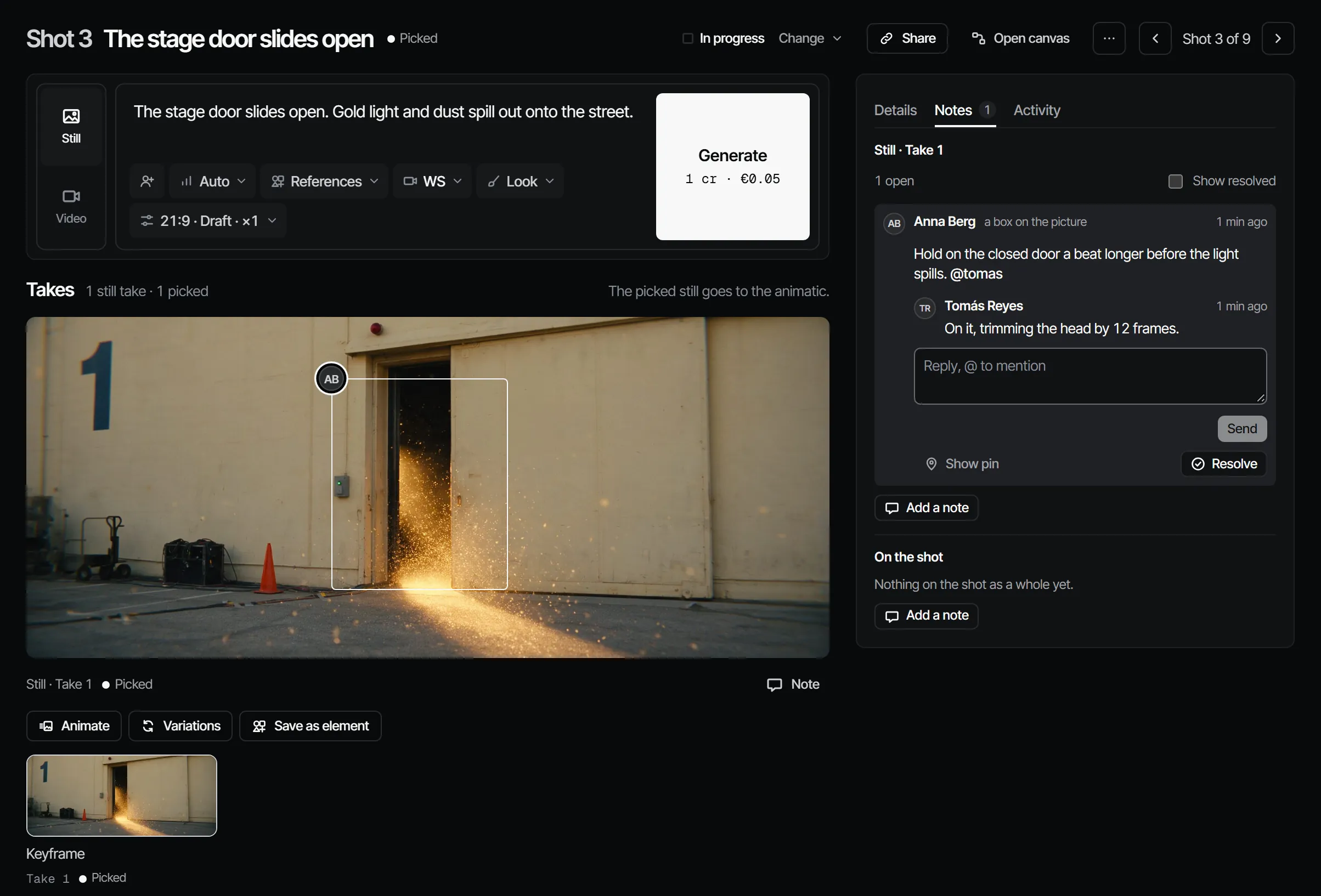
A take is one candidate for one layer of a shot: a still, a video, a line of dialogue, a sound or music. Takes come as drafts (quick and cheap) and finals (full quality). You make as many drafts as you need, pick the one you want, and render the final once, from that draft.
Layers #
| Layer | A take is | Picked take is used by |
|---|---|---|
| Keyframe | A still | The animatic; the start frame of the video |
| Video | A moving shot, draft or final | The Draft and Final departments, the cut |
| Dialogue | Spoken lines, per character per scene | The animatic and the cut |
| Sound (sfx) | Sound effects | The cut |
| Music | Music, usually per scene | The cut |
Draft and final #
| Draft | Final | |
|---|---|---|
| Quality | Lower resolution (for Seedance 2.5: 480p) | Full quality (for Seedance 2.5: 1080p) |
| When | Any time | Once the finals gate is open |
| Price, 6 s on Seedance 2.5 | 22.70 credits · €1.14 | 125.55 credits · €6.28 |
| Free plan | Yes | No: finals come with a plan |
Make final turns a draft into a final on the same take: the same prompt and the same seed, at final quality. It shows under any draft take that finished rendering, with the final's price, for the maker role and up; while the gate is closed it is greyed out with the reason. A draft you never make final costs only the draft price.
Making a take #
In a shot (or in Create), describe the shot, call cast, sets and props with @, and choose Generate. The
button shows the price in credits and euros before you start. Filmsquare compiles the prompt for the model: it adds
the right reference pictures of each element for the shot's size and angle, so nobody drags references by hand.
Unless you choose a Model, Filmsquare picks the model with the lowest expected cost per accepted take: its price divided by how often its takes get picked or signed off in your workspace. Without that data yet, the cheapest capable model wins. See Credits and what things cost.
Picking #
On each layer you Pick this take. The pick is what the animatic, the cut and the finals use. Picking needs the director role or higher. Picks are never overwritten: a new pick is added, and the history stays.
Variations, variants and retakes #
| Action | What you get |
|---|---|
| Variations | Two new drafts with the same prompt and settings, and new seeds |
| Animate | A video made from this still: the still becomes the picked still and the video's start frame |
| Use as reference | The picture or clip goes into the composer as a reference, as it is: no element, no start frame. You can also drag a take onto the composer, or pick takes and uploads under the + in the composer. A clip is a reference for a video only. In Create outside a production, a take from a production is copied into your private sketchbook first |
| Retake from notes | A new take with the notes' instruction added to the prompt; same model, references and inputs. See The cut |
| Make final | The final of this draft, on the same take |
Tools #
Create → Tools does one operation on a take. Outside a production, Create → Tools offers the takes of every production you are on and your loose takes. Open a tool on the wall, choose a take under the picture and the one thing the tool needs on the right (a cast member, a clip, a camera move, an effect), and the button shows the price in credits and euros. The result is a new take next to the original, and your pick stays. Using a tool needs the maker role or higher.
| Tool | Works on | What it does |
|---|---|---|
| Recast | Video (up to 30 s), still | Plays the take with another cast member: same motion, camera and timing; on a still, the same frame, pose and light |
| Match performance | Still, with a clip (up to 30 s) | Moves the still the way the clip moves: motion and timing from the clip, cast and set from the still |
| New angle | Video (up to 15 s) | Re-films the same moment along a camera move: orbit, crane, push in, pull out or truck |
| Effect | Video (up to 15 s), still | One effect: rain, snow, fog, day to night, golden hour, a slow push-in, a dolly zoom or slow motion. On a still it makes a 5 s clip |
| Extend | Video | The take carries on for more seconds after its last frame, with the same cast, set and camera |
| Upscale | Video (up to 30 s), still | More pixels, same picture: 1080p, 2K or 4K, or the faithful route that leaves faces as they were |
| Retouch | Still | Fixes one thing from a sentence: a stray object, a costume detail, a colour |
| Lip sync | Video (up to 30 s) | The mouth follows a voice: a dialogue take or an audio file |
| Remove background | Video (up to 30 s), still | Keeps the subject with clean edges and drops the background |
| Smooth motion | Video (up to 20 s) | Twice the frames at the same length |
Each tool card on the wall plays a short sample of a real run. A tool stays off when it is not set up on this server, or when the take has no finished render; a take longer than the tool takes is refused before anything is charged.
When a take fails #
A take shows Queued, Rendering, Ready, Failed or Cancelled. When a provider fails for a reason worth retrying, Filmsquare retries on its own, up to three attempts on the same take. A failed take can be retried by hand, and a queued or rendering take can be cancelled.
Sometimes a model refuses a take over its content, for example because it may show a real person or copy existing work. The take then says Refused by the model and why, costs no credits, and offers no retry: the same input is refused again. Change the prompt or the references and generate again. Filmsquare does not check your pictures itself; each model applies its own rules.
Uploading a take #
You can add takes you made elsewhere: upload a file onto a shot or scene layer, or import it from a URL through the API
(importFromUrls). An
uploaded take is marked as imported, with where it came from, and can be picked like any other. An imported take has
no generation behind it, so a retake from notes is not offered on it.
The first time you bring in your own files (an upload, a reference from your computer, an import), you confirm once that you have the rights to them and consent from anyone recognisable in them. Over MCP your own Claude asks you, and records it only after you say yes.
Every take is traceable #
Each take keeps its lineage: the model and version, the prompt, the seed, the element versions and references it was made with, and its cost. Versions of a take never change once made.
With your own Claude #
view_media shows Claude a still or a video poster; upload_file puts a file onto a shot or scene layer (10 MB
at most). For making, picking and estimating, Claude uses find_actions and run_action, for example
generateForShot with dryRun: true before the real call, selectTake to pick, and estimateTool before applyTool for a tool. See What Claude can do.
With Claude
MCPYour own Claude does this over MCP, in your name and with your role:
view_mediaLooks at a still, keyframe or take; video comes back as its poster plus a download link.
Ask: Show me the picked still of shot 3 and tell me if it matches its references.
upload_fileAdds a file you have as a new take on a shot or scene, or as a production asset (10 MB at most).
Ask: Upload this reference photo to the assets of the production.
find_actionsSearches everything the API can do and returns the matching actions with their inputs.
Ask: Find the action that changes a step's sign-off rule.
run_actionRuns one action found with find_actions, as you, with your role and rights.
Ask: Pick the second take of shot 5 on episode 2.
Connect Claude 5.1