2.0 How a film is organised2.3 Departments and the nine steps
Departments and the nine steps
The nine departments every episode moves through, what each one produces, what it waits for, and the extra departments a production can add.
Every production has nine departments, in production order: Writing, Breakdown, Casting, Wardrobe, Sets, Props, Animatic, Draft and Final. Each one is a step of every episode, with its own crew and its own sign-off, and a square on the production's Home → Status. A production can add four extra departments: Voices, Music, Sound and Edit.
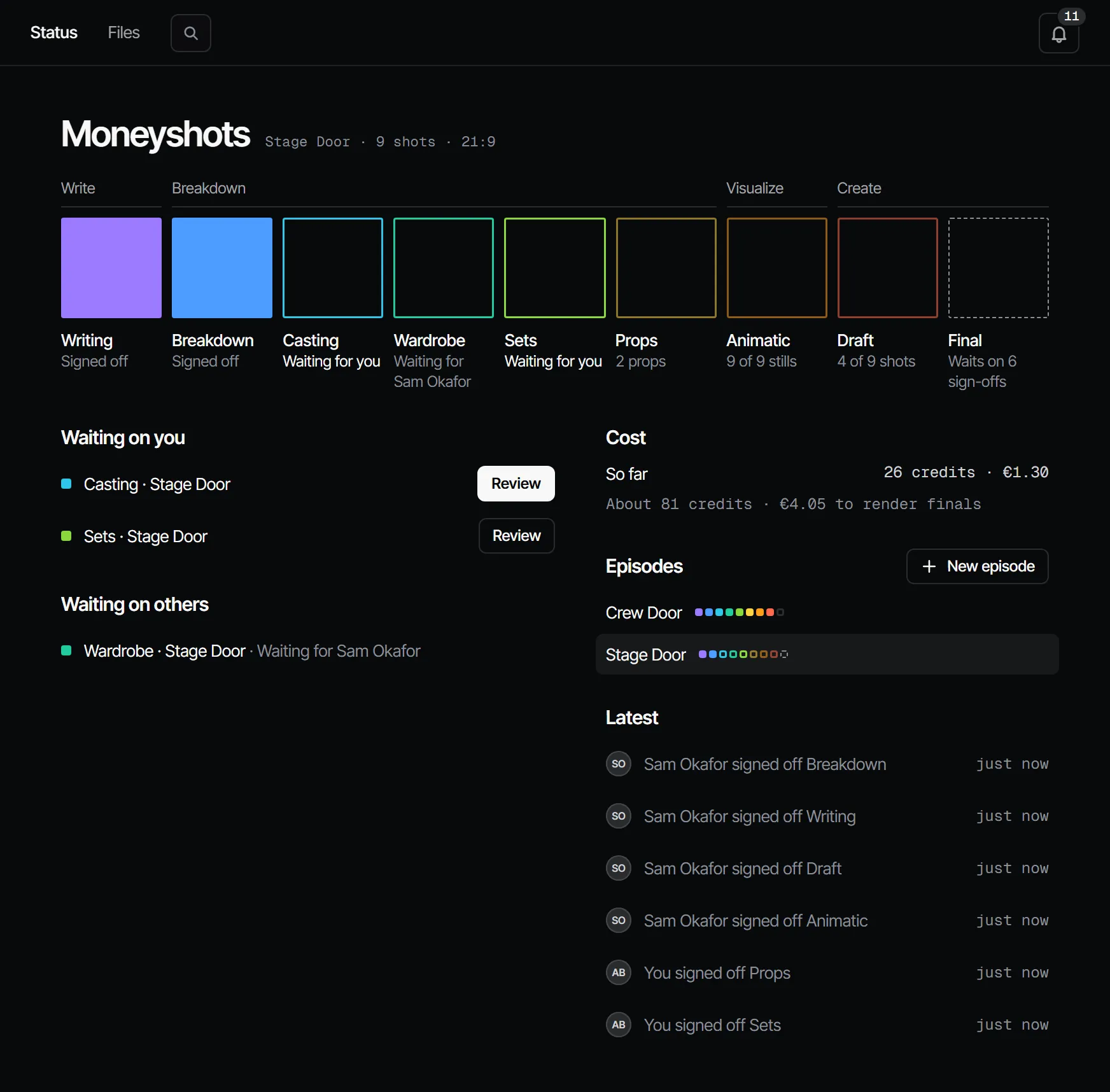
The nine steps #
| # | Department | Produces | Waits for | Locks the finals by default |
|---|---|---|---|---|
| 1 | Writing | The script and its revisions | — | No |
| 2 | Breakdown | Scenes, shots, dialogue, and the cast, sets and props they need | Writing | No |
| 3 | Casting | Cast members with reference pictures | Breakdown | Yes |
| 4 | Wardrobe | Costumes: looks per cast member per scene | Breakdown | Yes |
| 5 | Sets | Sets (locations) with references | Breakdown | Yes |
| 6 | Props | Props with references | Breakdown | Yes |
| 7 | Animatic | A picked still per shot, timed, with dialogue | Casting, Wardrobe, Sets, Props | Always gates |
| 8 | Draft | A picked draft video per shot | Animatic | Yes |
| 9 | Final | The finals, rendered from the picked drafts | Draft | — |
"Waits for" is the dependency: when an earlier department changes, the departments after it go stale too. The locks are the defaults of a new production; a template or the Crew page can change them. See Sign-off and gates.
Where you work on each one #
Departments say what is signed off; the features in the menu say where you work. A square on Home → Status opens its department.
| Department | Where |
|---|---|
| Writing | Script → Script and Docs |
| Breakdown | Script → Tagging and Storyboard → Shot list |
| Casting | Cast & sets → Cast |
| Wardrobe | Cast & sets → Costumes |
| Sets | Cast & sets → Locations |
| Props | Cast & sets → Props |
| Animatic | Storyboard → Storyboard, Animatic and 3D |
| Draft | Storyboard → Shots and Create → Tools |
| Final | Edit → Final |
Departments run in parallel #
Casting, Wardrobe, Sets and Props all wait only for the breakdown. Once it is signed off, they can be worked and signed off at the same time, each by its own crew. AI prepares every department at once; people make the calls.
What a step can say #
Each department square shows one state:
| State | Meaning |
|---|---|
| Open | Nothing has happened yet |
| In progress | Work is going on, for example "3 of 14 shots" |
| Waiting for sign-off | Someone asked; it names who it waits for ("Waiting for Anna", or "Waiting for you") |
| Changes requested | A signer asked for changes, with a note |
| Signed off | Every signer the rule needs has signed off the current version |
| Changed after sign-off | The work changed after the sign-off, so it no longer counts |
| Skipped | This production does not run this department |
A signed-off square is filled in the department's colour. A square waiting for sign-off is an outline in that colour with a slow pulse, an open one a neutral outline, the Final behind a closed gate a dashed one, and a skipped department a faint line.
Skipping a department #
A producer can skip a department on the Crew page (Crew & sign-off → Crew, Skip), for example Wardrobe on a trailer, and run it again later. The Animatic and the Final cannot be skipped: the finals gate always needs the animatic.
Extra departments #
A production can add departments the nine do not cover. Each one belongs to the core department it grows out of, sits right after it, and signs off like any step.
| Extra | Belongs to | Covers |
|---|---|---|
| Voices | Casting | Casting and recording the voices of your characters |
| Music | Animatic | Scoring the scenes on the timing of the animatic |
| Sound | Draft | Effects and atmosphere for the scenes and shots |
| Edit | Final | Assembling the cut from the picked takes and signing it off |
Add one on the Crew page under Add a department. Its tab then appears under its feature. See Extra departments.
Who works on a department #
On the Crew page a producer sets, per department, who works on it and who signs it off. A producer can also assign someone to one item inside a department: one cast member, one set, one scene or one shot. The department then says, for example, "Anna works on sets · Sam on Backlot street". See Crew, roles and access.
With your own Claude #
get_episode shows every step of an episode: signed off, waiting on whom, changes requested or open, and whether
the finals can render. The work_on_step prompt prepares one department for sign-off. See
Prompts and working method.
With Claude
MCPYour own Claude does this over MCP, in your name and with your role:
get_episodeShows an episode's scenes and shots in cut order, every department step, and whether finals can render.
Ask: Where does episode 2 stand, and who is each step waiting on?
work_on_stepPromptA working method: prepares one department step of an episode for sign-off, with the cost first.
Ask: Use the Filmsquare work_on_step prompt for the next step on episode 2.
Connect Claude 5.1