5.0 Work with your own Claude5.1 Connect Claude (MCP)
Connect Claude (MCP)
Connect your own Claude (claude.ai, Claude Desktop or Claude Code) to Filmsquare over MCP, and manage or disconnect the connection.
Every crew member can connect their own Claude to Filmsquare. Claude then works in your workspace in your name, with your role, on your own Claude subscription: it sees what waits for you, goes through feedback, breaks down a script and prepares a department. Filmsquare pays no AI tokens for it, and you pay no Filmsquare credits for Claude's own thinking.
The connection uses MCP (Model Context Protocol). The address is:
https://app.filmsquare.ai/v1/mcpYou find it, with copy buttons, under Settings → Claude: open the workspace menu at the top of the sidebar and choose Settings, then Claude.
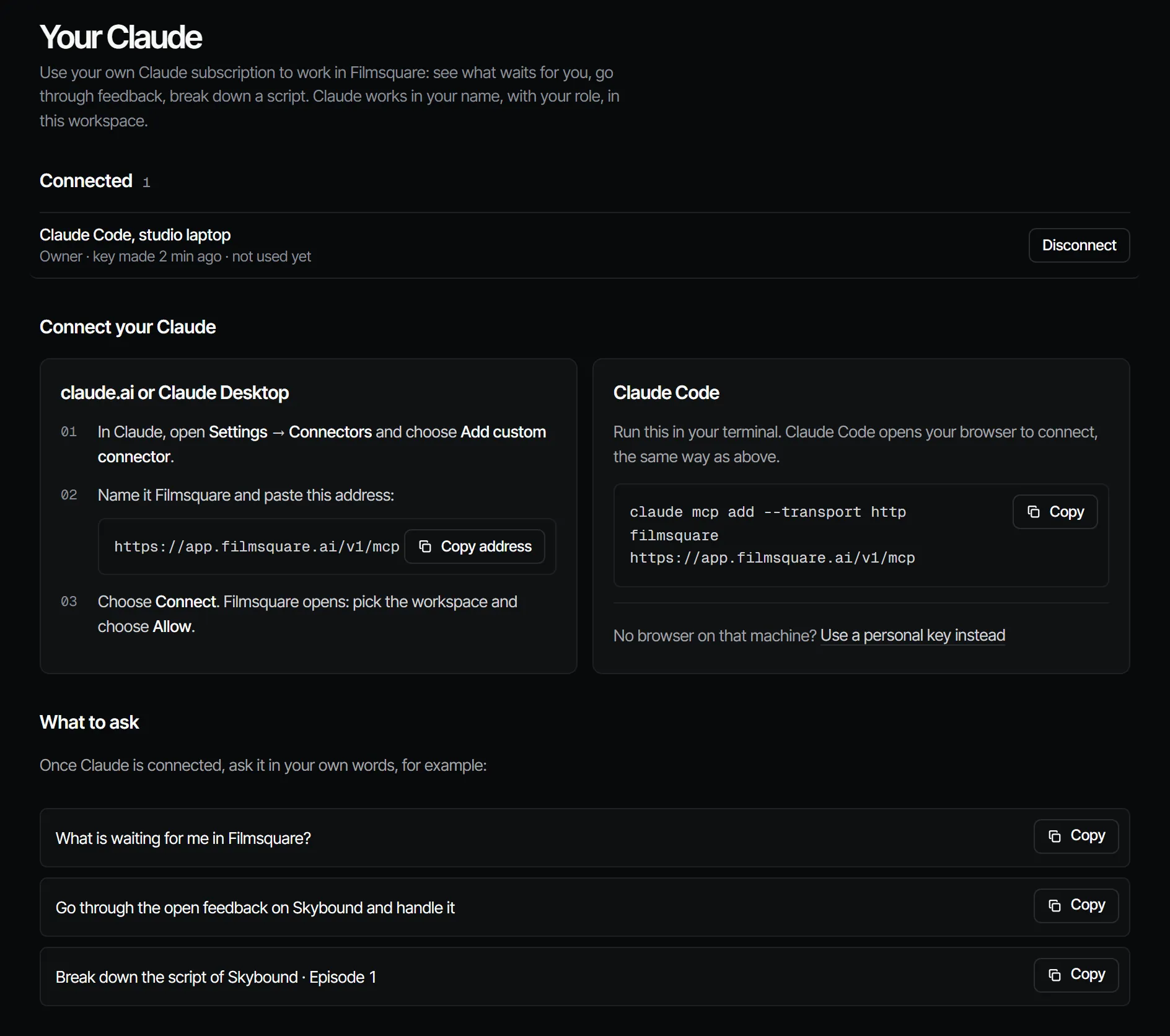
claude.ai or Claude Desktop #
- In Claude, open Settings → Connectors and choose Add custom connector.
- Name it Filmsquare and paste the address
https://app.filmsquare.ai/v1/mcp. - Choose Connect. Your browser opens the Filmsquare page Connect Claude. Sign in if you are not.
- Pick the Workspace Claude may work in.
- Under Claude works as, keep your own role or pick a lower one.
- Choose Allow. You can close the tab once Claude has opened.
Claude Code #
Run this in your terminal:
claude mcp add --transport http filmsquare https://app.filmsquare.ai/v1/mcpClaude Code opens your browser to connect, with the same Connect Claude page as above. If it does not, run
/mcp in Claude Code and choose the filmsquare server to sign in.
With a personal key instead #
For a machine where a browser sign-in does not suit, use a personal key:
- On Settings → Claude, choose Use a personal key instead.
- Give it a Name of the key (for example "Claude Code on my laptop") and choose Create a personal key.
- Copy the command. The key is shown once.
claude mcp add --transport http filmsquare https://app.filmsquare.ai/v1/mcp \
  --header "Authorization: Bearer fsk_…"
Anyone with this key can work as you in this workspace. Disconnect it if it leaks.
Check that it works #
Ask Claude in your own words, for example:
- "What is waiting for me in Filmsquare?"
- "Go through the open feedback on my production and handle it"
- "Break down the script of Episode 1 of my production"
Claude starts with whats_waiting or list_productions. Your connection shows up on Settings → Claude as soon
as it has connected, and the getting-started checklist ticks Connect your Claude.
See and disconnect connections #
Settings → Claude lists Your Claude connections: each connection's name, role and when it was last used. Disconnect stops it right away. This page lists only your own connections and keys.
What a connection is allowed to do #
- It is a key in your own name, in one workspace, with at most your role. If you chose a lower role, Claude has that role.
- Every call checks your role again, and only shows what you may see. If your role goes down or you leave the workspace, Claude's rights go with it.
- What Claude does shows up as you: in comments, picks, sign-offs and the activity of each item.
- A connection cannot make API keys, allow other connections or manage webhooks.
See What Claude can do for what is left out on purpose, and Prompts and working method for the safety rules Claude follows.
Technical details #
- Transport: Streamable HTTP, stateless JSON-RPC. Batches are not supported.
- Auth: OAuth 2.1 with PKCE (S256), dynamic client registration at
/oauth/register, metadata at/.well-known/oauth-protected-resource/v1/mcpand/.well-known/oauth-authorization-server. Codes are single-use and last 10 minutes. - Without a credential the endpoint answers
401with aWWW-Authenticateheader that points to the metadata. - A personal key or an API key (
Authorization: Bearer fsk_…) also works, as does a signed-in session. - Browser pages from other origins cannot call the endpoint (claude.ai is allowed).
With Claude
MCPYour own Claude does this over MCP, in your name and with your role:
whats_waitingLists the steps waiting on your sign-off and your unread notifications.
Ask: What is waiting on me in Filmsquare?
Connect Claude 5.1