3.0 The departments3.4 Casting
Casting
How cast members are made, versioned and signed off, and why casting gates the finals.
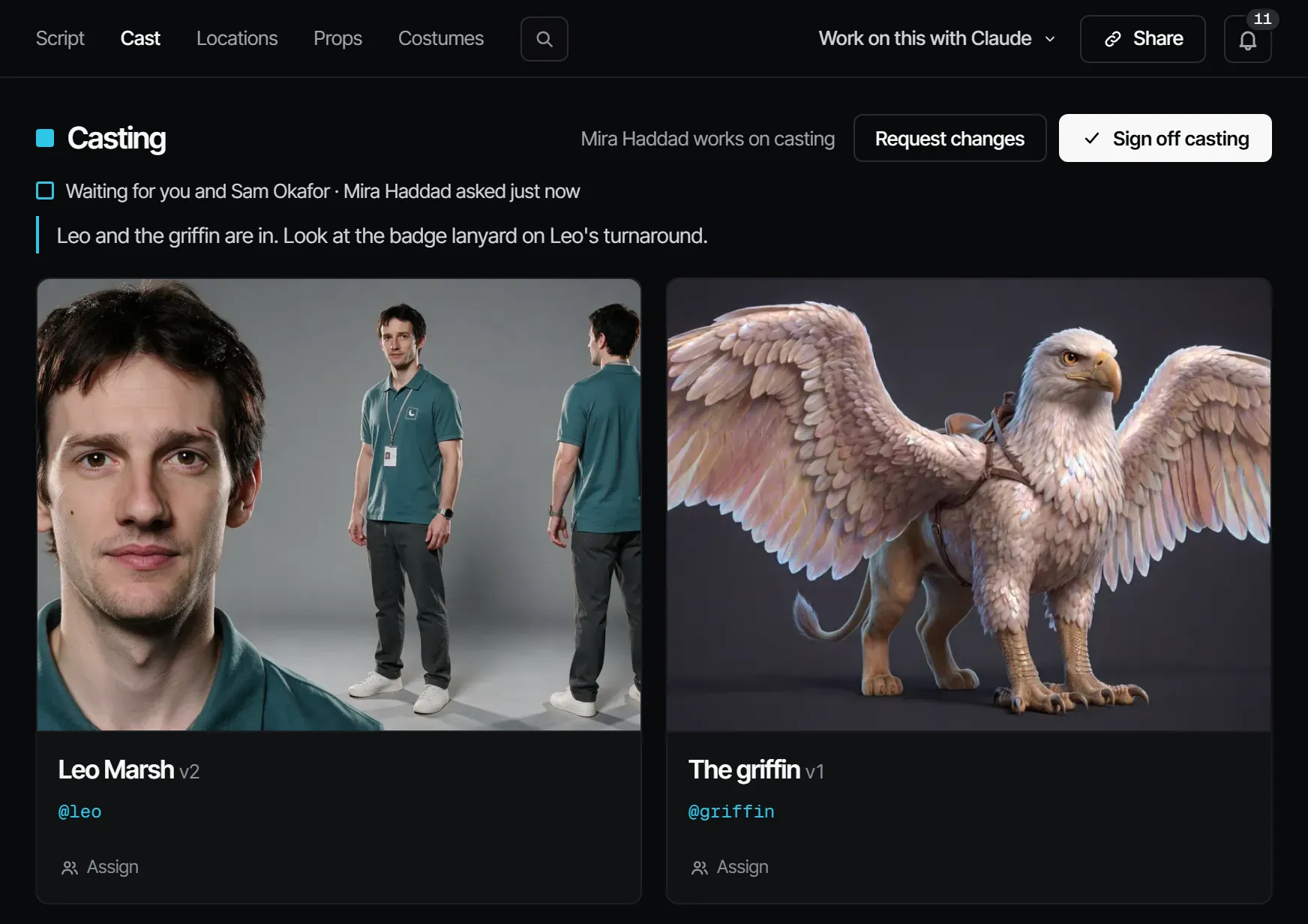
Casting decides what every character looks like. Each character in the breakdown becomes a cast member: an element with an @handle, versions and reference pictures. Every shot that names the character uses those references, so a face stays the same from shot to shot.
What this step produces #
A signed-off look per cast member: a current version with reference pictures (front, profile, full body and others). Cast & sets → Cast shows a card per cast member with its version ("Anna v2") and who works on it.
Who works on it #
On a film crew, a casting director does the work and the director signs it off. Those are crew jobs, not Filmsquare roles: what a person may do comes from their workspace role. A producer can assign the whole step, or one cast member to one person: "Anna works on casting · Sam on Keeper Hollis".
How AI prepares it #
- The breakdown brings in a cast member per character. To add one yourself, choose New cast member under Cast & sets → Cast.
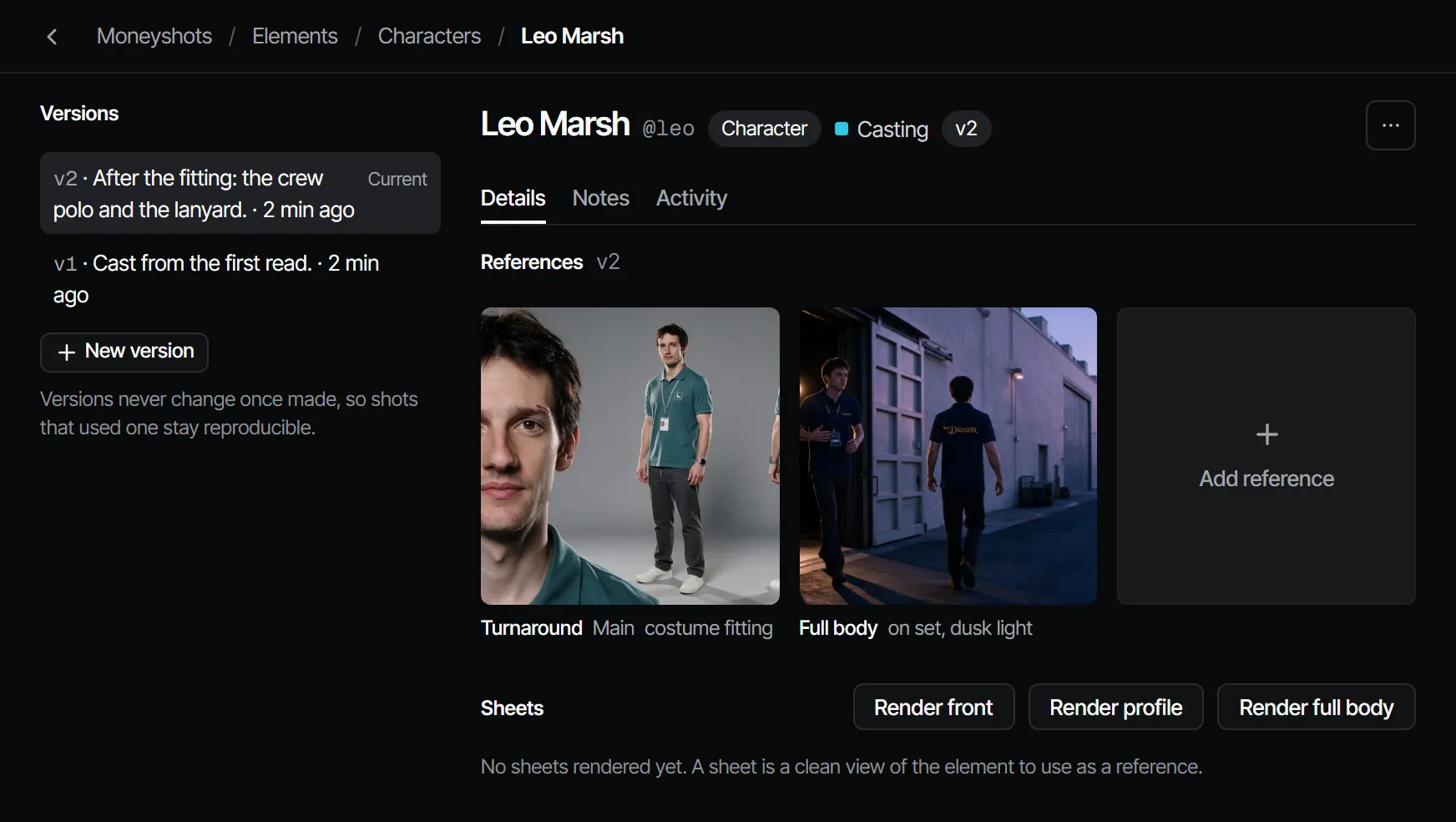
- Open the cast member. Under Sheets, choose Render front, Render profile or Render full body. A sheet is a clean view of the element to use as a reference. It renders on the cheapest capable image model.
- Choose Sign off as reference on the sheet you want. This makes a new version with that picture as a reference.
- Or upload a photo with Add reference.
See Elements, versions and @handles.
Signing it off #
Signing off Casting says: these faces are the cast. Casting locks the finals by default, so no final renders until it is signed off.
What makes it go stale #
A new version (v2 and up) of a cast member makes Casting Changed after sign-off in every episode that uses it ("A new cast version came in after the sign-off"). The same version also reopens Wardrobe and, when the production has it, Voices. The change flows on to the Animatic, the Draft and the Final.
Versions never change once a take used them. A new look is always a new version, so shots made with the old one stay reproducible.
What it costs #
A casting still costs 1.66 credits · €0.08 on Seedream 5.0 Pro, or 2.94 credits · €0.15 on Nano Banana 2 where the server offers it. Routing picks the model with the lowest cost per accepted take unless you choose one. See Credits and what things cost.
With your own Claude #
The tools are under With Claude on this page. Rendering a sheet, accepting it and forking a version go through
find_actions and run_action (generateForElement, acceptElementTake).
With Claude
MCPYour own Claude does this over MCP, in your name and with your role:
work_on_stepPromptA working method: prepares one department step of an episode for sign-off, with the cost first.
Ask: Use the Filmsquare work_on_step prompt for Casting on episode 2.
view_mediaLooks at a still, keyframe or take; video comes back as its poster plus a download link.
Ask: Show me the picked still of shot 3 and tell me if it matches its references.
upload_fileAdds a file you have as a new take on a shot or scene, or as a production asset (10 MB at most).
Ask: Upload this reference photo to the assets of the production.
request_signoffAsks the signers of a department step to sign off; they get a notification.
Ask: Ask the signers of Casting on episode 2 to sign off, with a note on what changed.
sign_offRecords your decision on a step: signed off or changes requested. Only when you ask it to decide.
Ask: Sign off Casting on episode 2 for me.
find_actionsSearches everything the API can do and returns the matching actions with their inputs.
Ask: Find the action that changes a step's sign-off rule.
run_actionRuns one action found with find_actions, as you, with your role and rights.
Ask: Pick the second take of shot 5 on episode 2.
Connect Claude 5.1