3.0 The departments3.3 Breakdown
Breakdown
How the script becomes scenes, shots, dialogue, cast, sets and props, and what signing off the breakdown means.
The breakdown turns the script into the plan of the episode: scenes, shots in the order of the cut, the dialogue per shot, and the cast, sets and props the episode needs. Casting, Wardrobe, Sets and Props start from it. You work on it in two places: Script → Tagging for the tags on the script, Storyboard → Shot list for the shots. Both carry the same sign-off.
What this step produces #
- Scenes, with their sluglines (
INT. KITCHEN - NIGHT). Scenes are optional: an episode can hold shots directly. - Shots, in the order of the cut, with a description, a size and a length.
- Dialogue lines, tied to the character who speaks them.
- Elements: a cast member per character, a set per location, a prop per prop. Each gets an @handle. See Elements, versions and @handles.
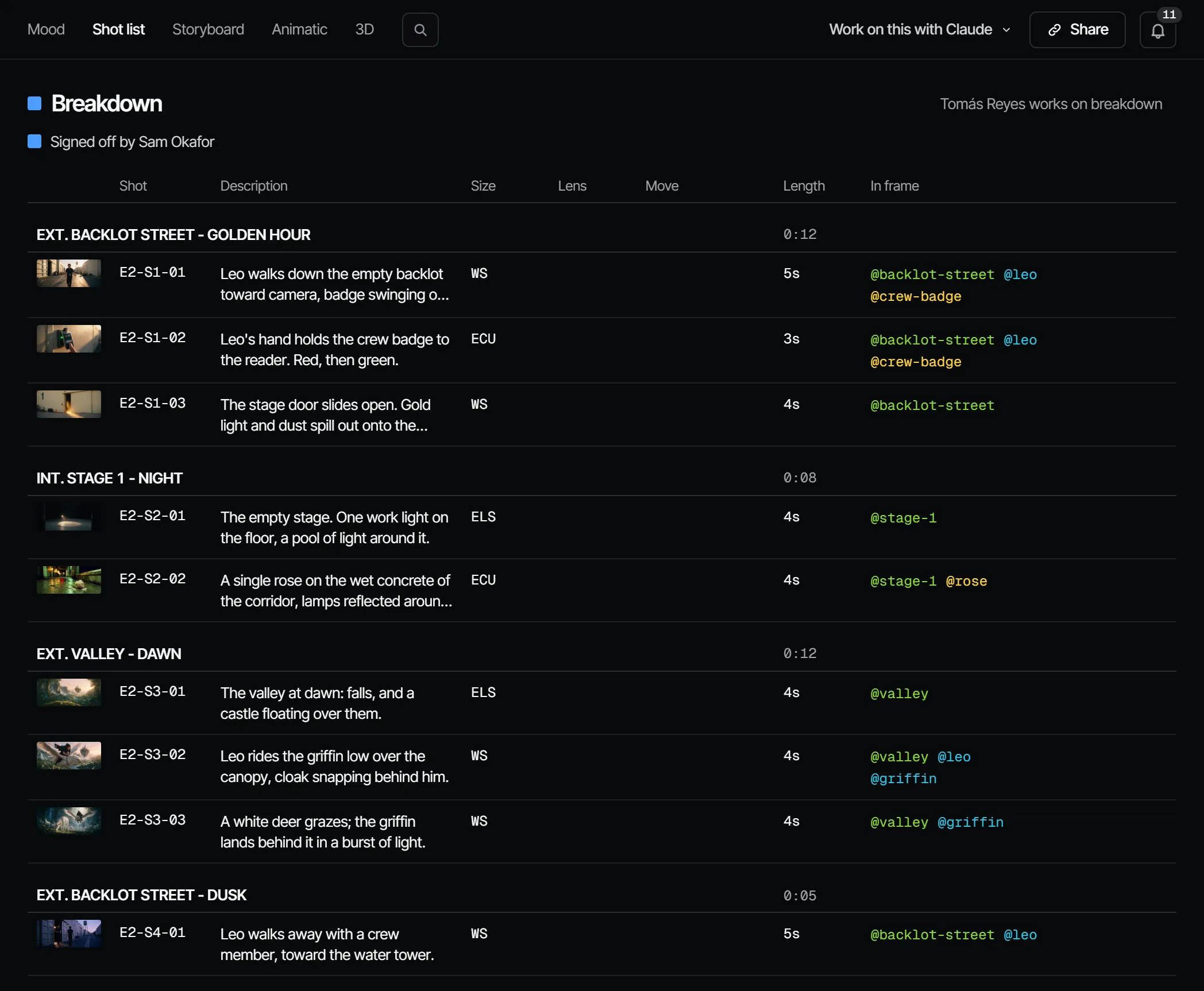
Storyboard → Shot list shows the shots grouped by scene, in the order of the cut.
Who works on it #
On a film crew, the director with a first AD or script supervisor. Those are crew jobs, not Filmsquare roles: what a person may do comes from their workspace role. A producer can assign people to the whole step, or to a single scene or shot (Assign crew to on the row).
How AI prepares it #
There are two readers:
| Reader | What you get | Cost |
|---|---|---|
| The Fountain reader | Scenes, characters and locations; one shot per scene | Free, instant |
Your own Claude (break_down_episode) | A shot list with acting notes, dialogue per shot, cast, sets and props, reusing the @handles that exist | Your own Claude subscription |
The Fountain reader runs on every script import. For the full shot list, ask your own Claude: it reads the script
with get_script, makes the breakdown and submits it with submit_breakdown. The server checks it with the same
validation as an import. Re-submitting updates what changed.
You can always fix the breakdown by hand: describe shots in the shot list and in the shot, add one with New shot, and change the order in the cut.
Saving a script in the app does not run a reader: the breakdown stays as it is until you import the script again or your own Claude submits a new one.
Tags on the script #
Script → Tagging shows the newest script version: the scenes on the left, the script on paper in the middle, and what is tagged in the scene in view on the right. A tag marks words as Cast, Location, Prop or Costume, in the colour of that department.
When someone with the maker role or higher opens it, Filmsquare tags the names and @handles of existing elements by itself, for free and without AI. What people corrected stays.
- Tag words: select them and choose a kind. All N in the script tags every place the same words stand.
- Correct a tag: click the tagged word and choose another kind, or Remove.
- Make the element: in the list on the right, Create makes the cast member, set or prop for a tag that has none yet. A tagged element shows its @handle.
Tags carry over to a new script version; words that are gone drop out.
The shot list #
Storyboard → Shot list is a table of the shots, with the running time per scene. A director or higher edits Description, Size, Lens, Move and Length in the cell: the arrow keys move between cells, Enter or typing opens one. In frame shows the elements in the shot, and a shot's code opens the shot.
Signing it off #
Signing off Breakdown says: these are the shots, the cast, the sets and the props we will make. It does not lock the finals by default. Casting, Wardrobe, Sets and Props depend on it. The sign-off is at the top of both Script → Tagging and Storyboard → Shot list: the shot list is signed off with the Breakdown square.
What makes it go stale #
Breakdown depends on Writing. A new script revision makes it Changed after sign-off ("The script changed after the sign-off"), and the change flows on to every department after it.
What it costs #
Nothing in credits: the Fountain reader is free, and your own Claude runs on your own subscription.
With your own Claude #
The tools are under With Claude on this page. Single changes, such as creating or moving a shot, go through
find_actions and run_action, and so do tags (listScriptTags, createScriptTag); Claude asks you before it
requests the Writing sign-off.
With Claude
MCPYour own Claude does this over MCP, in your name and with your role:
get_scriptReads the latest script revision of an episode, with the @handles that already exist.
Ask: Read the script of episode 2 and tell me which characters have no @handle yet.
submit_breakdownPuts your breakdown into Filmsquare: scenes, shots, dialogue, cast, sets and props.
Ask: Break down the script of episode 2 and submit it. Reuse the handles we already have.
get_episodeShows an episode's scenes and shots in cut order, every department step, and whether finals can render.
Ask: Where does episode 2 stand, and who is each step waiting on?
request_signoffAsks the signers of a department step to sign off; they get a notification.
Ask: Ask the signers of Breakdown on episode 2 to sign off, with a note on what changed.
sign_offRecords your decision on a step: signed off or changes requested. Only when you ask it to decide.
Ask: Sign off Breakdown on episode 2 for me.
work_on_stepPromptA working method: prepares one department step of an episode for sign-off, with the cost first.
Ask: Use the Filmsquare work_on_step prompt for Breakdown on episode 2.
find_actionsSearches everything the API can do and returns the matching actions with their inputs.
Ask: Find the action that changes a step's sign-off rule.
run_actionRuns one action found with find_actions, as you, with your role and rights.
Ask: Pick the second take of shot 5 on episode 2.
Connect Claude 5.1